
Bizto India CRM Panel banner

Bizto India CRM Panel

What We Offer

One CRM for Leads, Sales, Billing and Your Online Store

Bizto India CRM Panel replaces scattered Excel sheets, notebooks and separate apps with one secure dashboard that your whole team can use.
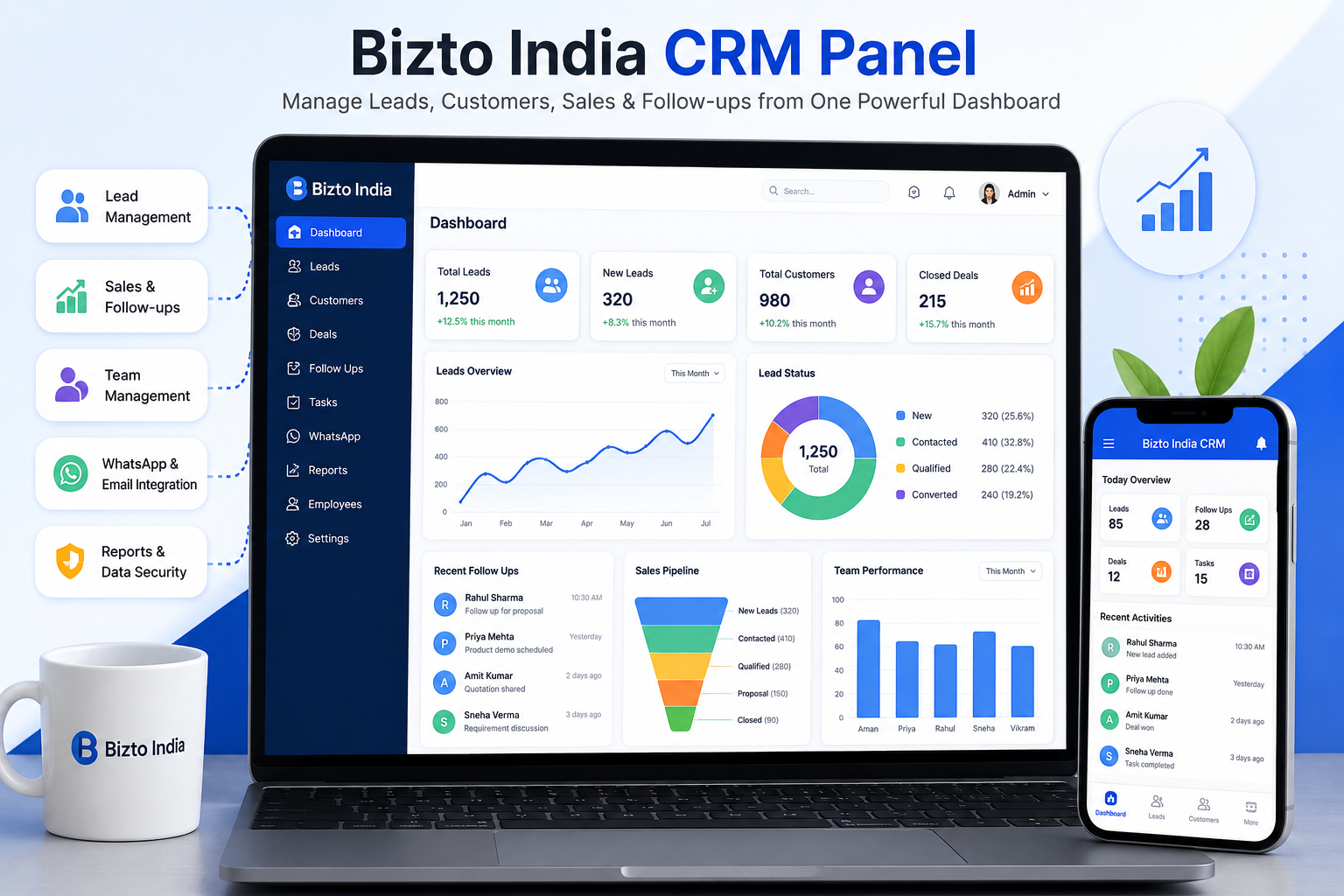
Bizto India CRM Panel dashboard showing customers, enquiries, billing and reminders

Bizto India CRM Panel

Manage your leads, customers, sales, and follow-ups from one powerful dashboard. The CRM is built to streamline daily operations, improve customer engagement and boost team productivity.

Every enquiry is tracked in real time, follow-ups are reminded automatically, WhatsApp and email messages go out on schedule, and each employee sees only what you allow. If you sell online, the same panel also runs your website store.

  • Lead & Enquiry Management
  • Sales, GST Billing & Follow-up Tracking
  • Employee, Roles & Permissions
  • WhatsApp & Email Automation
  • Online Store Management & Data Security
CRM Features

What the CRM Panel Does, Module by Module

Each module covers one part of your daily work. They share the same customer data, so nothing has to be typed twice.

Dashboard & Analytics

See the whole business at a glance, with Total and Today cards and an optional date filter.

  • Customers, enquiries, birthdays, anniversaries
  • Billing, pending payments, low stock
  • Website customers, orders, enquiries and sales

Customers & Enquiries

One simple rule everywhere: a person with at least one invoice is a Customer, otherwise an Enquiry.

  • Type a mobile number and existing records appear, then the form auto-fills
  • Duplicate numbers are blocked
  • Remarks with date, time and follow-up date

Custom Registration Fields

Add the questions your business needs without any developer.

  • Text, number, date, dropdown and long text
  • Mark fields required or optional
  • Answers are saved on the customer profile

Products & Stock

Keep one product list for the shop counter and the website.

  • Variants by size and colour, images, SKU, HSN, GST
  • Minimum stock alerts and a Low Stock view
  • “Price on request” option for B2B products

GST Billing

Create invoices in seconds from your product list.

  • GST at 0, 5, 12 and 18 percent, discount and round-off
  • Custom invoice prefix and numbering
  • Paid and pending payment tracking

Tasks & Reminders

Nobody forgets a call, a birthday or a follow-up.

  • Task list for the team
  • Birthday, anniversary and follow-up reminders
  • Upcoming events and a notification bell

WhatsApp & Email Automation

Messages go out on their own, using templates you control.

  • Welcome, birthday, anniversary and follow-up messages
  • Order status updates to online customers
  • Your own WhatsApp Business API and SMTP email

Lead Integrations

Bring leads in from other places instead of copying them by hand.

  • Website contact and product enquiry forms
  • Lead portals through API integration
  • New leads become customer records automatically

Team & Access Control

Give every employee exactly the access their job needs.

  • Super Admin, Admin and Manager roles
  • 34 individual permissions you can tick on or off
  • Activity log of who did what
How It Works

From First Enquiry to Repeat Customer

This is the daily flow inside the CRM Panel, from the moment someone contacts you.

1

An enquiry arrives

It comes from your website form, a connected lead portal, a call or a walk-in entered by staff. The CRM saves it with its source and rings the notification bell so the team sees it immediately.

2

The team follows up

Staff add remarks, set the next follow-up date and keep the full conversation history on the customer profile. A welcome message goes out on WhatsApp and email when a new customer is added.

3

A bill is created

When the customer buys, a GST invoice is created from your product list. The enquiry now becomes a Customer, stock is updated and pending payments are tracked.

4

Automation keeps the relationship alive

Birthday and anniversary wishes, and follow-up messages after a period of silence, are sent on schedule by the CRM. Any new remark, update or bill restarts the follow-up timer.

5

The owner watches the numbers

The dashboard shows customers, enquiries, billing, pending payments, low stock and online sales, so decisions come from live data and not guesswork.

Online Store

Run Your Website From the Same Panel

Your e-commerce website reads everything from the CRM. Change a banner, price, colour or policy in the panel and the website updates, with no coding and no developer call.

What you can manage

  • OrdersUpdate status, add courier and tracking, cancel, approve returns and refund. The customer is notified at each step.
  • Payments & RefundsRazorpay payments, failed attempts, refunds and cash on delivery to collect.
  • Products on WebsiteHide a product, mark it Featured, New or Best seller, and add SEO text.
  • Categories & BannersCategory pictures and a hero slider with separate desktop and mobile images.
  • Home Page SectionsTurn sections on or off, rename headings and change their order.
  • Pages & FAQPrivacy, Terms, Returns, Shipping, About Us and any new page you want.
  • Coupons & ReviewsPercentage or flat codes with limits, and approval of customer reviews.
  • State-wise ShippingSet a different delivery charge for each state if you need to.
  • E-mail TemplatesEdit OTP, order, shipped, delivered, cancel, return and refund emails, preview them and send a test.
  • Website SettingsColours and fonts, social links, SEO, checkout rules, Razorpay keys and SMTP email.

What your customers get on the website

Shop & Search

Filters for category, price, size, colour and offers, with fast product search.

Cart & Wishlist

Cart drawer, wishlist and coupons that work without reloading the page.

Secure Checkout

Saved addresses, GST, state shipping, COD, and Razorpay for UPI, cards and net banking.

Customer Account

Email OTP sign-up, order tracking, cancel and return requests, and saved addresses.

Prices are always calculated on the server from your product records, so a customer can never change a price from the browser. Every confirmed website order also creates an invoice in Billing, so your online sales show up in the same dashboard graphs.

Team & Security

Role-Based Access and Data Security

You decide who can see and change what. The menu itself hides every page an employee is not allowed to open.

Role Typical use
Super Admin Business owner. Full access, creates employees, assigns roles and decides permissions.
Admin Runs the daily business. Sees only the modules the Super Admin allows.
Manager Handles customers, billing and follow-ups within the permissions given.

New sign-ups stay pending until the Super Admin approves them and assigns a role, so nobody gets in on their own.

Built-in protection

  • Passwords stored in hashed form
  • CSRF protection on every form
  • Account lock after repeated wrong passwords
  • Only genuine image files can be uploaded
  • Activity log of employee actions
  • Separate installation and database for every client
Getting Started

Live in Days, Not Months

Every client gets a private installation with their own database, logo, colours, payment keys and WhatsApp details. We handle the setup for you.

Install

We create your database, install the CRM and your Super Admin login in about five minutes.

Configure

We add your logo, products, custom fields, WhatsApp and email templates, billing rules and Razorpay keys.

Train & Go Live

Your team learns the panel, we run a test order and test messages, and then you go live.

FAQ

Bizto India CRM Panel FAQs

Clear answers to the questions businesses ask most before choosing a CRM.

The Bizto India CRM Panel is a web-based CRM and online store admin panel that manages leads, customers, products, GST billing, follow-up reminders, WhatsApp and email messages, team access and website orders from one dashboard. It is built for Indian businesses that want sales, billing, customer communication and their online store in a single system.

Any business that handles enquiries, customers and repeat follow-ups can use it, including retail and fashion stores, product sellers, service companies, real estate teams and B2B suppliers. Because custom fields, products, billing settings and message templates are all configurable, each business sets the panel up around its own process.

Every enquiry from a website form, a connected lead portal or a manual entry is saved in one list with its source, a follow-up date and remarks. The team is alerted with a notification, and an enquiry becomes a customer as soon as the first invoice is created. Duplicate mobile numbers are never saved twice.

Yes. The CRM sends welcome, birthday, anniversary and follow-up messages on WhatsApp through the WhatsApp Business API, and welcome and order emails through your own SMTP account. You choose the templates and the timing, for example how many days before a birthday, or how many days after the last activity a follow-up goes out.

The follow-up timer starts from the customer's last activity, such as a new remark, a profile update or a new bill. When the set number of days passes with no activity, the customer appears in Follow-up Reminders and, if automatic sending is on, receives an approved WhatsApp template once. Any new activity restarts the count.

Yes. The Online Store menu controls the whole website from the CRM: orders, payments and refunds, banners, categories, home page sections, policy pages, FAQs, coupons, reviews, state-wise shipping, email templates, colours, fonts, SEO and Razorpay keys. Products and stock are added once in the CRM and appear on the website automatically.

Yes. The connected store accepts UPI, cards, net banking and wallets through Razorpay, plus cash on delivery. Payments are verified on the server, a webhook confirms payments even if the customer closes the browser, and refunds for cancelled or returned orders can be processed from the CRM order page.

Yes. You can create GST invoices at 0%, 5%, 12% or 18% with discounts, round-off, a custom invoice prefix and payment status. Prices and GST are always read from your product records on the server, and website orders create their invoice automatically so online sales appear in the same billing reports.

Super Admin creates employees and assigns roles such as Admin or Manager, then ticks exactly which permissions each role gets, for example view customers, create bills or manage website settings. The menu shows an employee only the pages that role allows, and an activity log records who did what.

Yes. Passwords are stored hashed, every form is CSRF-protected, database queries are prepared, uploads accept real images only, and an account locks temporarily after repeated wrong passwords. Each client gets a separate installation and database, so one business's customers, orders and payment keys are never mixed with another's.

A new installation takes about five minutes: create an empty database, upload the files and run the installer, which creates the Super Admin account. After that you add your logo, products, WhatsApp and email details, and Razorpay keys from the settings pages. Bizto India can complete the setup and train your team for you.

Yes. Click the Get CRM Demo button on this page or contact Bizto India to book a walkthrough. We show the dashboard, customer and billing flow, WhatsApp automation and online store management, and map them to your business so you can decide whether it fits before you commit.

Ready to Transform Your Business?

Book a meeting with us and we will help you find the correct strategy for your company.

Book a Meeting
💬
BI

Bizto India

Website Development Support

Hello 👋
Welcome to Bizto India.
Please select an option below.